Install OpenCode and Connect It to APITokenRouter
OpenCode is an open-source AI coding assistant that can run in terminal and desktop/web-style interfaces.
New accounts start with a $0 balance — top up before your first request. Top up from $5. If a request returns 402 with "wallet balance is insufficient", your balance is empty — your base URL and key are fine. Top up and retry.
1. Connect to APITokenRouter
If OpenCode Desktop is already installed, add APITokenRouter:
- Open OpenCode Desktop and click the settings icon in the lower-left corner.
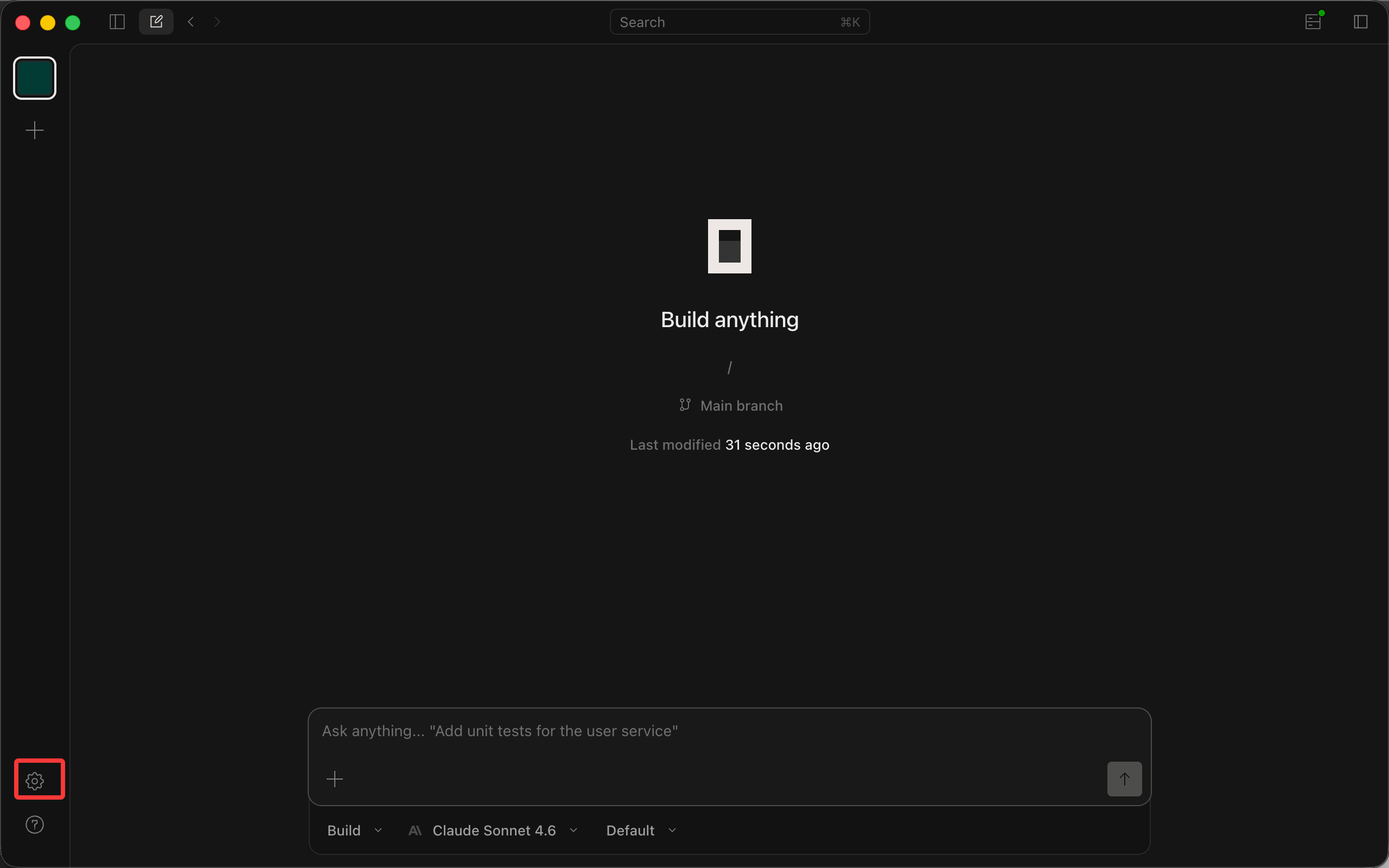
- In the left navigation, choose Server -> Providers.
- At the bottom of the provider list, find Custom provider and click Connect.
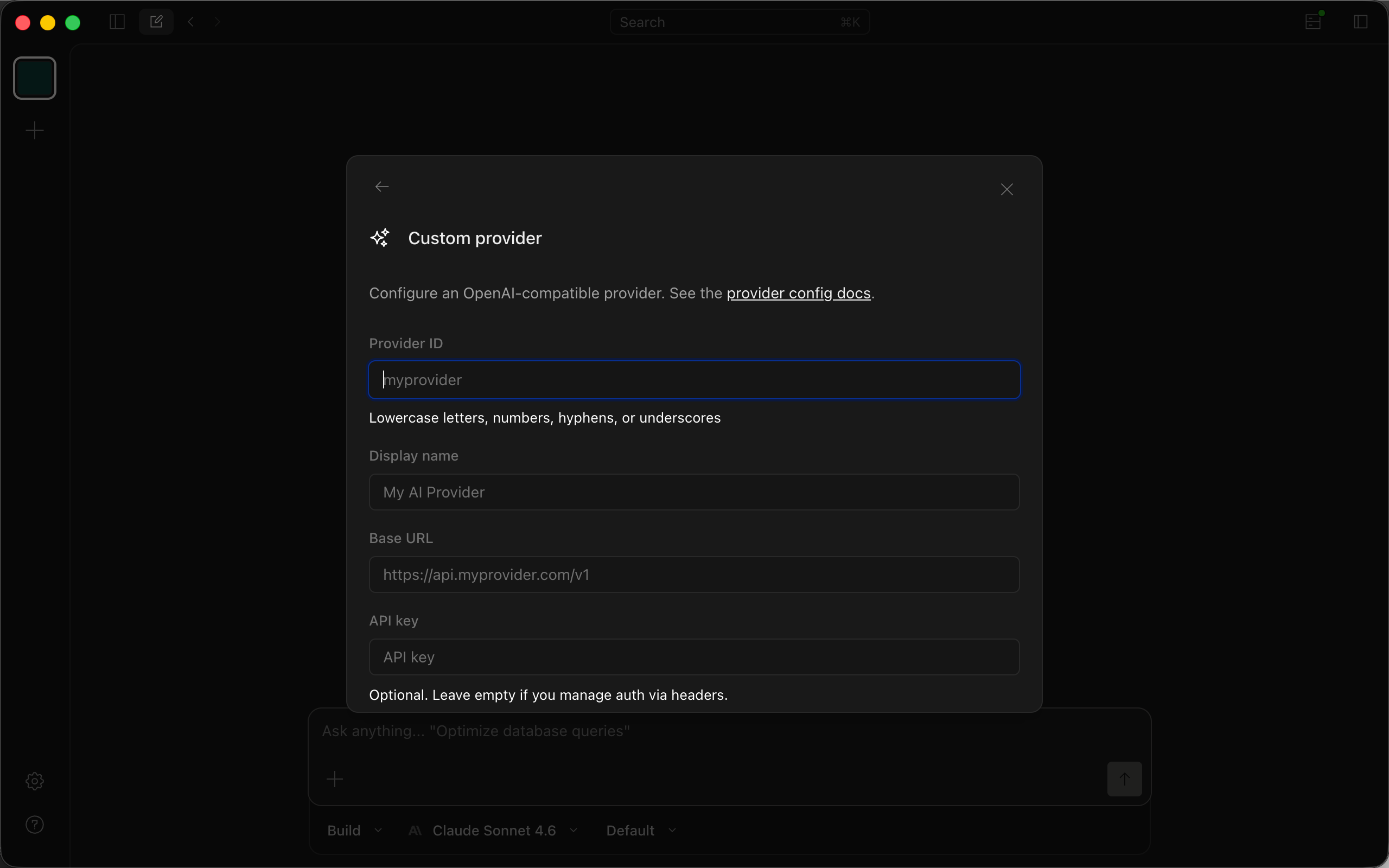
- Fill in the custom provider form:
- Provider ID:
teamorouter - Display name:
APITokenRouter - Base URL:
https://apitokenrouter.com/v1 - API key: paste the key you created in the APITokenRouter dashboard
- In Models, click Add model and add the model IDs you need.
GPT9
gpt-6.1-solgpt-6-astragpt-6-solgpt-6-lunagpt-5.6-solgpt-5.6-terragpt-5.6-lunagpt-5.5gpt-5.4
Claude12
claude-opus-5-5claude-sonnet-5-5claude-haiku-5-5claude-fable-5-1claude-opus-5claude-fable-5claude-sonnet-5claude-opus-4-8claude-opus-4-7claude-opus-4-6claude-sonnet-4-6claude-haiku-4-5
Gemini5
gemini-3.8-flashgemini-3.7-flashgemini-3.6-flashgemini-3.5-flash-litegemini-3.1-pro-preview
DeepSeek6
deepseek-flashdeepseek-flash-freedeepseek-v4-flash-vision-expdeepseek-v4-prodeepseek-v4-flashdeepseek-v4-flash-free
GLM4
glm-5.3-flashglm-5.3-flash-freeglm-5.3glm-5.2
Grok1
grok-4.6
- Leave request headers empty.
- Click Submit to save.
Note: the Custom provider form in OpenCode Desktop only supports the OpenAI protocol, so Claude requests sent through it can miss the prompt cache, fail, or cost more than they should. For Claude models, use the config file below instead.
Use a config file (opencode.json)
A config file can add a second provider that sends Claude requests in the native Anthropic Messages format, so Claude in OpenCode can use prompt caching and thinking the way it does in Claude Code. Long sessions cost less that way.
- Give OpenCode your API key. OpenCode 2 sends requests from a background service, so set the key there:
opencode service set env APITOKENROUTER_API_KEY "your APITokenRouter API key"
- Add this to
~/.config/opencode/opencode.json(all projects) or toopencode.jsonin your project root:
{
  "$schema": "https://opencode.ai/config.json",
  "model": "teamorouter-claude/claude-sonnet-5-5",
  "providers": {
    "teamorouter": {
      "name": "APITokenRouter",
      "package": "@opencode/ai/providers/openai-compatible",
      "settings": {
        "baseURL": "https://apitokenrouter.com/v1",
        "apiKey": "{env:APITOKENROUTER_API_KEY}"
      },
      "models": {
        "gpt-6.1-sol": {},
        "gemini-4-argon": {},
        "deepseek-v4-pro": {},
        "kimi-k3.1-pro": {},
        "glm-5.3": {}
      }
    },
    "teamorouter-claude": {
      "name": "APITokenRouter (Claude)",
      "package": "@opencode/ai/providers/anthropic-compatible",
      "settings": {
        "baseURL": "https://apitokenrouter.com/v1",
        "apiKey": "{env:APITOKENROUTER_API_KEY}"
      },
      "models": {
        "claude-opus-5-5": {},
        "claude-sonnet-5-5": {},
        "claude-haiku-5-5": {}
      }
    }
  }
}
- Restart OpenCode, run
/modelsand pick a model, for exampleteamorouter-claude/claude-sonnet-5-5.
-
teamorouteruses the OpenAI-compatible protocol for GPT, Gemini, DeepSeek, Kimi, GLM and other models.teamorouter-claudeuses the Anthropic Messages protocol for Claude. Both use the same key and balance. -
OpenCode 1 uses the older format:
providerinstead ofproviders,npm(@ai-sdk/openai-compatible, or@ai-sdk/anthropicfor Claude) instead ofpackage, andoptionsinstead ofsettings. -
To add more models, put their IDs under
models.GET /v1/modelswith your key lists every model ID.
2. Install OpenCode from scratch
Download and install
Install or upgrade from the OpenCode download page.
Run and configure
Run:
opencode
Add APITokenRouter
Open OpenCode Desktop and follow steps 1 to 7 in the previous section.
Set the model
In Settings, choose Server -> Models and switch the default chat model to a APITokenRouter model. New conversations will use it by default.
Start using OpenCode
Return to the main OpenCode Desktop screen and create a new conversation.
Pay with USDT or USDC
You don't need a credit card to use OpenCode with APITokenRouter. Top up your balance with USDT, USDC or ETH straight from an exchange app (Binance, OKX and others) or any wallet: click Pay with crypto in the top-up dialog, pick a coin and network, and send. The minimum is $5 (USDT on BEP20), and no browser extension is needed. Step by step: Pay for Claude and GPT APIs with crypto (USDT).