
Cherry Studio Custom API Provider Setup: API URL, Key and Models
To use API Token Router in Cherry Studio, add a custom provider under Settings → Model Services: set the API URL to https://api.apitokenrouter.com (Cherry Studio appends /v1/chat/completions itself), paste the API key you created in the API Token Router dashboard, then click Fetch model list and pick your models. Cherry Studio is an open-source multi-model AI desktop client for macOS, Windows, and Linux. It lets you manage and switch between multiple LLM providers in one interface.
New accounts start with a $0 balance — top up before your first request. Top up from $5. If a request returns 402 (400 on the OpenAI format) with "wallet balance is insufficient", your balance is empty — your base URL and key are fine. Top up and retry.
1. Connect to API Token Router
If Cherry Studio is already installed, add API Token Router as a model provider:
- Click the settings icon in the top-right corner of Cherry Studio.
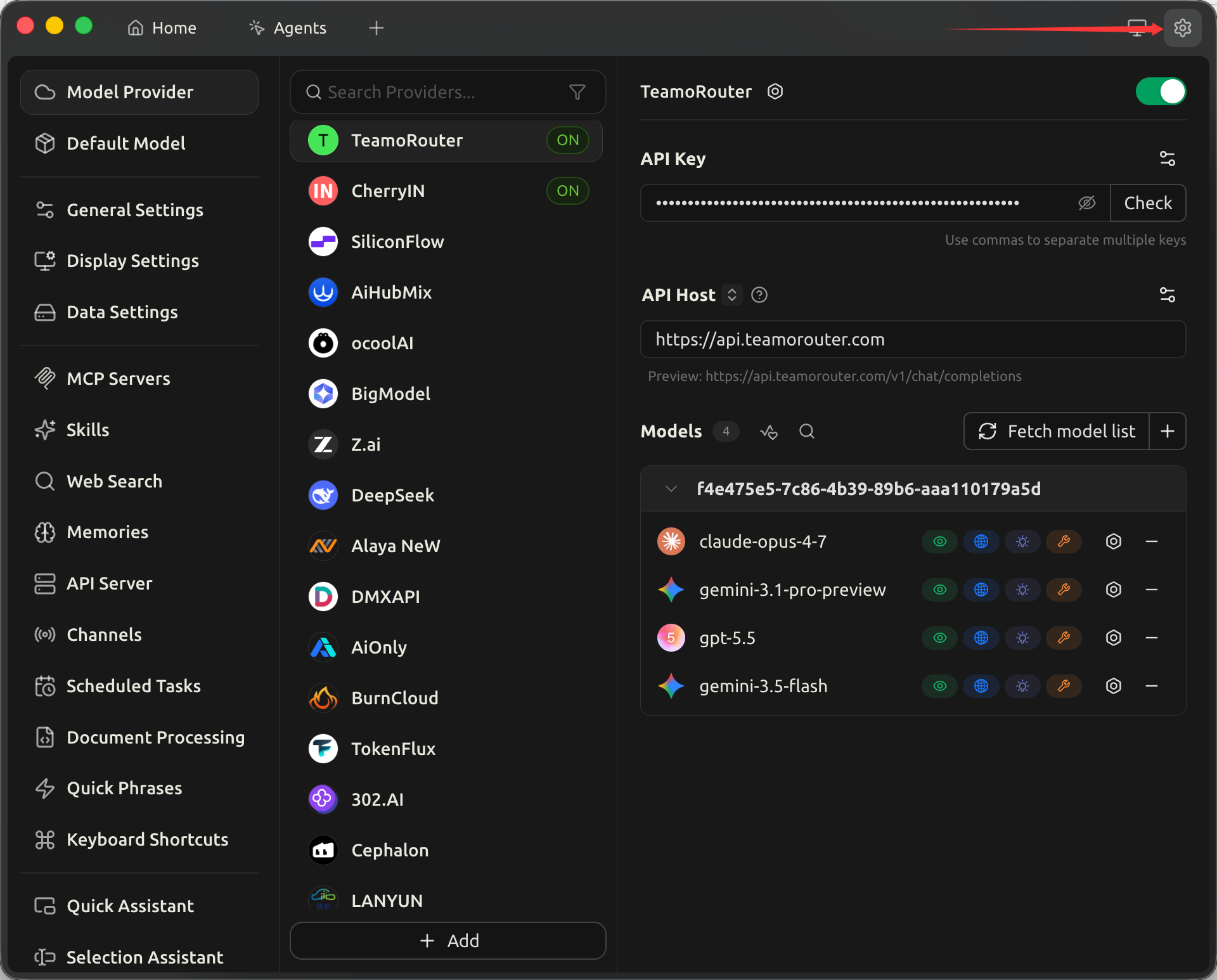
- Choose Model Services in the left navigation.
- At the bottom of the provider list, click Add to create a custom provider.
- In the dialog, fill in:
- Provider name:
API Token Router - Provider type: choose the provider type that matches the model family you want to use:
| Model family | Provider type |
|---|---|
| GPT | OpenAI |
| Claude | Anthropic |
| Gemini | Gemini |
| DeepSeek | OpenAI |
| GLM | OpenAI |
| Grok | OpenAI |
- After creation, fill in the provider detail panel:
- API Key: paste the key you created in the API Token Router dashboard. Separate multiple keys with commas.
- API URL:
https://api.apitokenrouter.com
Cherry Studio appends /v1/chat/completions automatically. The preview line should show https://api.apitokenrouter.com/v1/chat/completions.
- In Models, click Fetch model list so Cherry Studio can load all models exposed by API Token Router.
- Click the check button beside API Key to verify the key. If the connection succeeds, the provider is ready.
- Turn on the Enable toggle in the top-right corner of the provider panel.
2. Install Cherry Studio from scratch
Download and install
Download the installer from the Cherry Studio website:
- macOS: download the
.dmg, or runbrew install --cask cherry-studio - Windows: download and run the
.exeinstaller - Linux: download the
.AppImageor.debpackage
Configure API Token Router
After the first launch, follow steps 1 to 8 in the previous section.
Set a default model
In Settings, open Default Models and switch the default chat model to a API Token Router model such as claude-opus-4-7.
Start using Cherry Studio
Go back to Home or Agents, create a new conversation, confirm that the model picker shows your API Token Router model, and send a message.
Pay with USDT or USDC
You don't need a credit card to use Cherry Studio with API Token Router. Top up your balance with USDT, USDC or ETH straight from an exchange app (Binance, OKX and others) or any wallet: click Pay with crypto in the top-up dialog, pick a coin and network, and send. The minimum is $5 (USDT on BEP20), and no browser extension is needed. Step by step: Pay for Claude and GPT APIs with crypto (USDT).